FOR HELP DESK & IT SUPPORT TECHNICIANS MOVING INTO REMOTE WORK
IT Support for Remote & Hybrid Workplaces — Learn to Troubleshoot Without Being in the Room
- 18 chapters, 60 pages
- Companion workbook + 15-checklist pack + bonus resources
- 12-ticket Real Remote Support Ticket Lab + final assessment
- Instant digital download
A practical, 18-chapter guide to supporting remote and hybrid users — home networks, VPN, Microsoft 365, Teams, devices and security — built around one realistic remote service desk, so you finish genuinely ready for real tickets.
No dry theory, no vendor-specific guesswork. Just real remote tickets, a repeatable troubleshooting method, and the exact reasoning a remote support technician needs when they can't see the screen, hear the fan, or plug in the cable themselves.
Secure checkout. Instant digital delivery — download links arrive by email right after payment.
Remote Support Isn't Just Office Support Done From Home
Most IT courses teach troubleshooting as if you can see the screen, hear the fan, or plug in the cable yourself. Remote support takes all of that away — and almost nothing teaches you how to reason without it.
Courses Built Around a Desk You Can Walk Up To
Most beginner IT content assumes you can glance at a router's lights or notice a loose cable. Remote support means gathering every piece of evidence through questions alone.
VPN, Home Networks and Compliance Treated as an Afterthought
Home routers, VPN tunnels, device compliance and hybrid network profiles rarely get proper beginner-level coverage — yet they sit behind a huge share of genuine remote tickets.
No Practice Handling a User You Can't See
Verifying identity, gaining consent, and giving instructions a non-technical user can actually follow are skills that only come from practising real remote scenarios — not from reading definitions.
From “I Can Fix It If I'm Standing There” to “I Can Diagnose It From Anywhere”
By the end of the course, you'll have worked through dozens of realistic remote tickets — the exact reasoning a remote support technician uses when a fault could be the home network, the device, the VPN, or the company service.
- A repeatable remote-troubleshooting framework you can apply to almost any ticket
- Real practice separating home-network, device, VPN and company-service causes
- Safe, consent-based use of remote-support tools, with identity verified every time
- Confident, jargon-free communication with a non-technical user you can't see
- A completed 12-ticket Ticket Lab, checklist pack and final assessment, ready to reference on the job
Course Curriculum
Eighteen chapters, built to be worked through in order — each one following real Northbridge Solutions Ltd tickets from first symptom to resolution.
01Understanding Remote & Hybrid IT Support▾
What remote and hybrid support actually mean, the full environment a remote user's traffic passes through, and where a technician's own visibility ends.
- Office Support vs. Remote Support
- What a Remote User's Connection Actually Passes Through
- Common Remote-Support Ticket Categories
02How Remote Troubleshooting Is Different▾
A repeatable framework for gathering evidence, asking the right questions and giving instructions without ever touching the device yourself.
- Gathering Evidence You Can't See Yourself
- A Repeatable Remote Troubleshooting Framework
- Ticket — A Report That Says Almost Nothing
03Home Networks for IT Support Technicians▾
Routers, IP addresses, DHCP and DNS explained at exactly the level a support technician needs — and how to tell a home-internet fault from a company-service one.
- The Home Network, in Plain Terms
- Three Very Different Kinds of ‘It's Not Working’
- Ticket — ‘Nothing Works, But My Phone's Got Internet’
04Wi-Fi & Internet Troubleshooting▾
An eight-step connectivity flow using ipconfig, ping, nslookup and tracert, applied to five realistic Wi-Fi and internet tickets.
- Why ‘No Internet’ Rarely Means What It Says
- Five Real Remote Connectivity Tickets
05VPN Support for Beginners▾
What a VPN actually does, split tunnelling in plain terms, and five full VPN tickets covering connection, authentication and performance faults.
- What a VPN Actually Does
- Ticket — ‘VPN Won't Connect’
- Ticket — ‘VPN Connects, But I Can't Reach the Shared Drive’
- Ticket — ‘My Internet Is Extremely Slow When VPN Is Connected’
- Ticket — Revisiting a Disconnecting VPN
06Remote Support Tools▾
Screen sharing versus full remote control, and the nine-step Remote Session Workflow — including consent, even under pressure.
- Screen Sharing vs. Remote Control
- The Remote Session Workflow
- Ticket — A Request That Skips the Workflow
07Supporting Microsoft 365 Remotely▾
Applying VPN and connectivity reasoning to Outlook, Teams, OneDrive and SharePoint tickets in the remote context.
- One Extra Question for Every Remote Microsoft 365 Ticket
- Five Remote Microsoft 365 Tickets
08Teams, Headsets, Cameras & Remote Meetings▾
A five-step audio/video decision tree for the most common hybrid-meeting tickets — microphones, speakers, cameras and Bluetooth devices.
- Why Audio Faults Are So Often a Selection Problem
- Five Teams Audio and Video Tickets
09Laptops, Monitors & Docking Stations▾
What a docking station's single cable actually does, and how to troubleshoot monitors, USB hubs and charging faults before assuming hardware failure.
- What a Docking Station Actually Does
- Ticket — ‘My Second Monitor Doesn't Work at Home’
- Ticket — ‘My Keyboard and Mouse Stopped Working Through the Dock’
- Ticket — ‘My Laptop Won't Charge Through the Dock’
10Printers in Remote & Hybrid Work▾
Company printers versus personal printers, and where company policy — not technical ability — decides what IT actually supports.
- Company Printers vs. Personal Printers
- Ticket — ‘Can You Connect My Personal Printer to My Work Laptop?’
- Ticket — ‘I Can't Print to the Office Printer from Home’
11Accounts, Passwords & MFA for Remote Users▾
Why remote identity verification is genuinely harder, and how to handle urgent password and MFA requests without ever skipping a step.
- Why Remote Verification Is Genuinely Harder
- Ticket — ‘Can You Just Reset My Password? I'm Working From Home’
- Ticket — MFA While Travelling
12Security in Remote & Hybrid Work▾
Four realistic security scenarios — a lost laptop, a phishing click, café Wi-Fi, and a shared family device — and exactly what a first-line technician should do.
- Scenario — Laptop Lost on a Train
- Scenario — Credentials Entered Into a Phishing Page
- Scenario — Working From Café Wi-Fi
- Scenario — A Family Member Used the Company Laptop
13Device Management & Compliance Basics▾
What ‘managed’ and ‘compliant’ actually mean, how to investigate a compliance block, and lost-device response at a conceptual level.
- What ‘Managed’ and ‘Compliant’ Actually Mean
- Following Up — A ‘Device Doesn't Meet Requirements’ Message
- Lost-Device Response, at a Conceptual Level
14Communication with Remote Users▾
Giving instructions a non-technical remote user can actually follow, and managing frustration without ever going silent mid-session.
- Instructions the User Can Actually Follow
- A Realistic Remote Support Conversation
- Managing Frustration, Interruptions and Silence
15Ticketing & Escalation for Remote Support▾
What a genuinely useful remote-support ticket and escalation actually contains — and why ‘VPN not working, escalating’ tells second line almost nothing.
- What ‘Escalating’ Actually Needs to Contain
- The Same Escalation, Done Properly
16Real Remote Support Ticket Lab▾
Twelve full realistic remote tickets, worked through the same eight-field method — solve each one yourself before checking the model reasoning.
- No Internet on Company Laptop
- VPN Will Not Connect
- VPN Connects But Shared Drive Unavailable
- Teams Microphone Doesn't Work
- External Monitor Isn't Detected at Home
- OneDrive Has Stopped Synchronising
- New Phone, MFA No Longer Works
- Home Wi-Fi Too Slow for Teams Calls
- Cannot Access SharePoint Remotely
- Company Laptop Missing Security Updates
- Company Laptop Lost While Travelling
- Request to Connect a Personal Printer
17Supporting Hybrid Offices▾
What genuinely changes at the office end for a hybrid user — hot desks, shared equipment, and Windows' own network-profile setting.
- Hot Desks and Shared Equipment Aren't Actually Identical
- Ticket — ‘It Works at Home, But Not in the Office’
18Building Remote Support Career Skills▾
What this course has genuinely built, how to keep practising without a managed environment, and a realistic look at where a remote support role can lead.
- What You've Actually Built
- Practising Without a Managed Environment
- Where This Can Lead
What's Included
Everything you need to go from beginner to genuinely remote-support-ready — not just another ebook to skim once and forget.

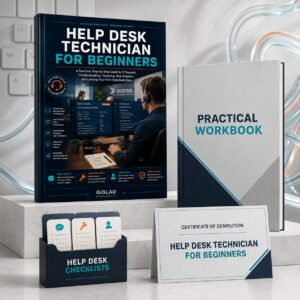
Course Ebook
The full 18-chapter course, following Ryan Walsh, a newly hired Remote Support Technician at Northbridge Solutions Ltd, through real remote and hybrid tickets from first day to job-ready.
- 18 chapters, 60 pages
- One continuous fictional company and technician, start to finish
- Six genuine Windows interface screenshots plus original diagrams
- A full 12-ticket Real Remote Support Ticket Lab

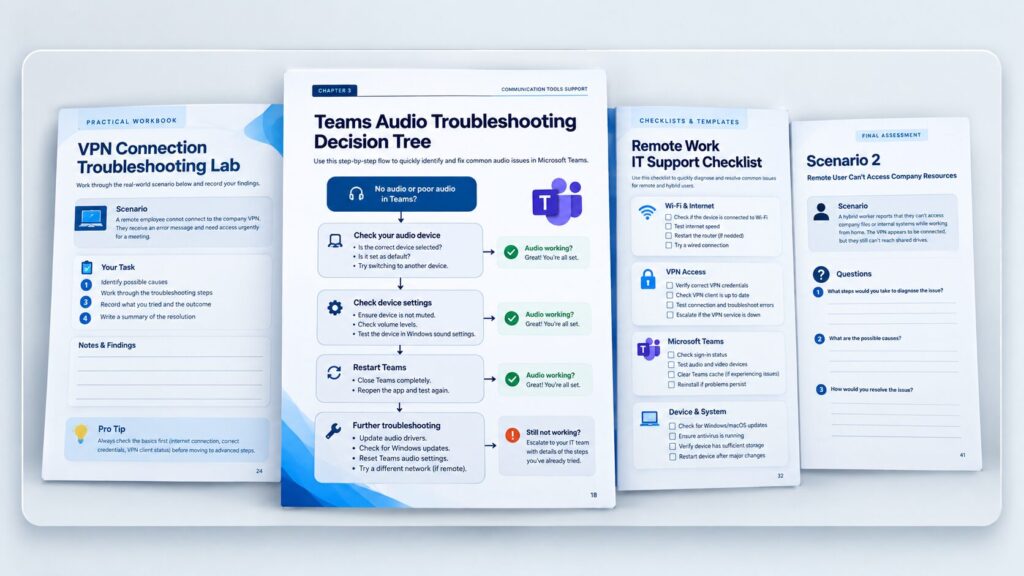
Practical Workbook
18 worksheets matching every chapter, so you practise diagnosing your own home network, VPN, Teams and security scenarios rather than just reading about them.
- A worksheet for every chapter, in order
- Home-network mapping and ipconfig/ping/nslookup labs
- Your own worked ticket and escalation-writing exercises
- Interview preparation pages

Checklists, Templates & Final Assessment
15 quick-reference checklists, 9 ready-to-copy templates, and a full 30-question final assessment with a fully explained answer key.
- 15 printable, call-ready troubleshooting checklists
- Ticket, escalation, VPN and terminology templates
- A 30-day practice plan and interview preparation sheet
- 30 assessment questions across MCQ, scenarios and escalation-decisions, fully answered

Certificate of Completion
A downloadable certificate to mark that you've finished the course — a genuine addition to your CV and LinkedIn profile.
- PDF format, ready to save or print
- Personalised with your name and completion date
Delivered as digital files viewable on any device. Estimated course completion time: around 6–8 hours, plus your own home-network practice time.
- Course Ebook
- Practical Workbook
- Checklists, Templates & Final Assessment
- Certificate of Completion
Secure checkout. Instant digital delivery — download links arrive by email right after payment.
Includes lifetime access.
Trending Products









Frequently Asked Questions
Yes. It's written for beginners and career changers with solid general computer skills but little or no remote-support experience. Every technical term — VPN, DHCP, DNS, MFA and more — is explained clearly the first time it appears, and the whole course is built around practising, not memorising.
You'll receive six PDF files: the course ebook, the practical workbook, the checklist pack, the bonus resources & templates pack, the final assessment with answer key, and a certificate of completion — instantly after checkout.
No genuine course can guarantee that, and this one doesn't claim to. What it gives you is the same practical foundation a real remote support desk expects — structured troubleshooting, real ticket practice, and honest interview preparation — built through practice, not promises.
No. It teaches transferable, vendor-neutral remote-support skills — home networking, VPN concepts, Windows, Microsoft 365 and general remote-support tool principles — and is not affiliated with, endorsed by, or sponsored by Microsoft or any VPN or remote-support tool vendor.
Ready to Stop Guessing and Start Diagnosing With Confidence?
Get the full course, workbook, checklist pack, bonus resources, final assessment and certificate — and build the practical foundation your next remote or hybrid support role actually needs.
Secure checkout. Instant digital delivery — download links arrive by email right after payment.