- You cannot add another "Build Your First WordPress Website" to your cart. View cart
Website & App
Website Maintenance Made Simple — A Clear System for Keeping Your Website Healthy
- 7 modules, 28 short lessons
- Fillable workbook included
- Checklists, templates & bonus planners
- Instant digital download
A practical, 7-module guide to backups, safe updates, security, performance and keeping a website genuinely maintained — with a fillable workbook, checklists & templates, bonus resources and a final assessment.
No guesswork, no jargon — a clear, module-by-module system for keeping any website backed up, updated, secure and fast.
Secure checkout. Instant access from your dashboard as soon as payment clears.
A Website Left Unmaintained Doesn't Stay Safe for Long
Once a website is live, it's easy to assume the work is done. In reality, outdated software, unverified backups and ignored warning signs are how small websites get hacked, slowed down or lost altogether.
Updates Get Postponed Indefinitely
Most software updates exist to close a security gap, not just add features, and postponing them is one of the most common ways a website gets compromised.
No Verified Backup When Something Breaks
A backup that has never been checked is an assumption, not a safeguard, and the gap is usually only discovered during an actual emergency.
Small Problems Go Unnoticed Until They Cost You
A broken form, a slow homepage or an out-of-date copyright date all quietly erode trust, and none of them announce themselves until a visitor has already left.
From Uncertain to Genuinely Under Control
By the end of the course, you won't just know the theory, you'll have a real, working maintenance routine in place on your own website, built module by module.
- A verified, off-site backup you actually trust
- A safe, repeatable routine for updating WordPress core, themes and plugins
- Stronger login security, sensible user roles and a plan for warning signs
- A faster homepage, tested and measured with a real performance tool
- A weekly, monthly, quarterly and annual maintenance calendar already in use
Course Curriculum
Seven modules and 28 short lessons, built to be worked through in order. Every module ends with a practical activity and a knowledge check, all following one fictional example, The Willow Tree Florist.
01Module 1: Understanding Website Maintenance▾
Understand what website maintenance covers, identify every part of your site that can drift out of date, and build the preventive habit that keeps it healthy.
- What Website Maintenance Means
- Why Websites Need Ongoing Attention
- The Parts of a Website
- Preventive Maintenance and Building the Habit
02Module 2: Backups and Safe Preparation▾
Put a verified, off-site backup in place, covering both files and database, before anything else is touched.
- Why a Backup Must Come First
- Files Versus the Database, and Your Backup Tools
- Frequency and Off-Site Storage
- Verifying a Backup and Your Pre-Maintenance Checklist
03Module 3: Updates Without Breaking the Website▾
Update WordPress core, themes and plugins safely, in the right order, one item at a time, with a calm plan for when something breaks.
- Why Updates Matter
- Checking Compatibility, and Updating in the Correct Order
- Auto-Updates, Maintenance Mode and Staging
- Testing After an Update, and When One Goes Wrong
04Module 4: Essential Website Security▾
Strengthen passwords, enable multi-factor authentication, review user roles and know the warning signs of a compromised site.
- Passwords and Multi-Factor Authentication
- User Roles and Removing Old Accounts
- Secure Hosting, SSL and Login Protection
- Warning Signs and What to Do After a Suspected Compromise
05Module 5: Speed and Performance▾
Identify the most common causes of a slow website, use a basic performance-testing tool, and fix speed problems one change at a time.
- Why Website Speed Matters
- Oversized Images and the Other Common Culprits
- Mobile Performance and Basic Testing Tools
- Making Changes One at a Time
06Module 6: Content and Functional Testing▾
Confirm the website genuinely works: links, forms, checkout, navigation, mobile view and the details a returning visitor notices.
- Broken Links, Forms and Checkout
- The Monthly Testing Map
- Navigation, Mobile and Browser Testing
- Keeping Information Current, and Accessibility Basics
07Module 7: Your Maintenance System▾
Turn everything into one weekly, monthly, quarterly and annual maintenance calendar, with clear records and a plan for when to ask for help.
- Weekly, Monthly, Quarterly and Annual Tasks
- Recording Updates, Changes and Incidents
- Storing Information Securely, and Knowing When to Ask for Help
- Your Final Website Health Check
What's Included
Everything you need to build and keep a genuine maintenance routine.

Course Ebook
Seven modules and 28 short lessons covering backups, safe updates, security, performance and functional testing, brought together into one repeatable system.
- 7 modules, 28 short lessons
- One continuous fictional worked example (The Willow Tree Florist), start to finish
- Real WordPress screenshots, illustrative recreations and an original diagram, each clearly labelled
- A Final Practical Project (Your Final Action Plan) and a glossary

Practical Workbook
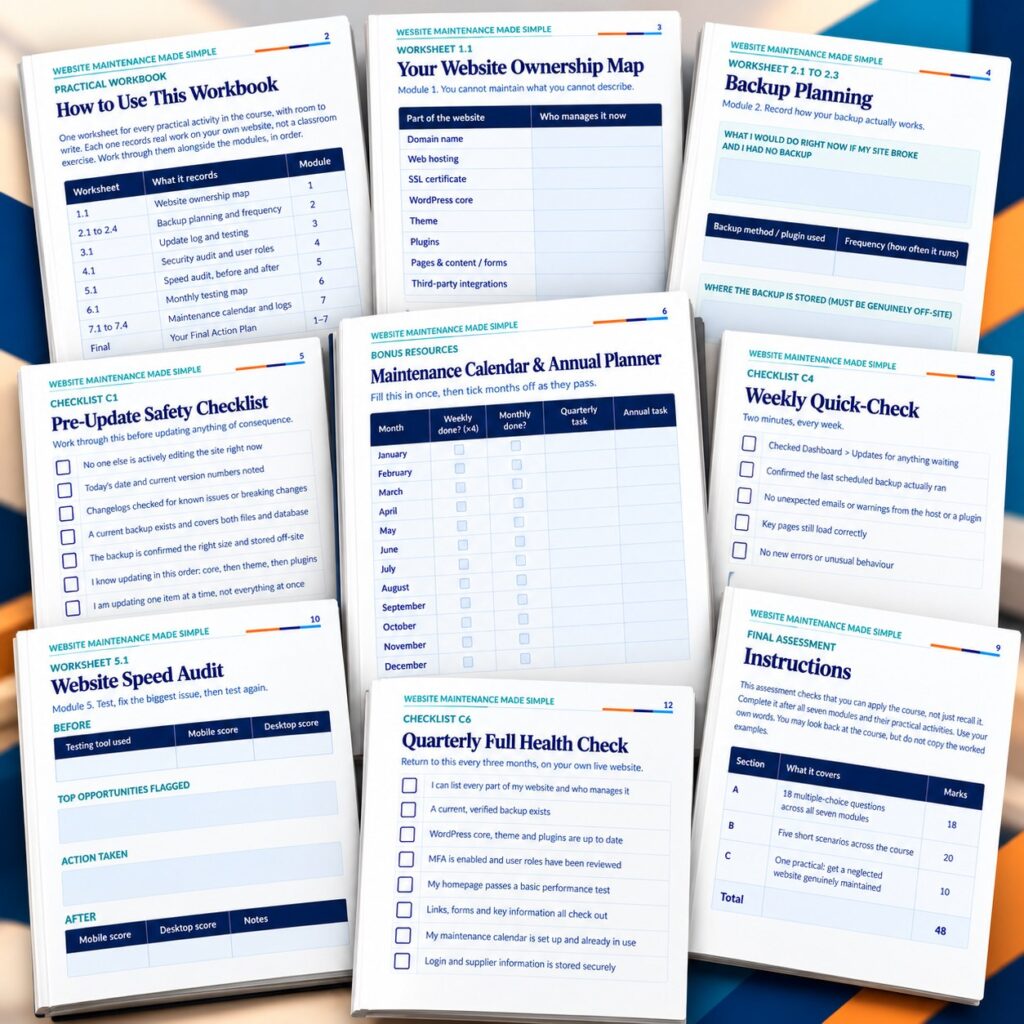
15 pages of fillable worksheets that build your real maintenance routine, plus a twelve-part Final Action Plan.
- A worksheet for every practical activity, fully fillable
- Website ownership map and backup planning worksheets
- Security audit, speed audit and testing logs
- Maintenance calendar, change log, incident log and final action plan

Checklists, Templates & Bonus Planners
A reusable checklists & templates pack, plus a bonus Maintenance Calendar & Annual Planner and Backup & Update Log.
- 7 fillable checklists and 3 templates (change log, access audit, renewal tracker)
- Pre-Update Safety and Incident Response checklists
- Twelve-month Maintenance Calendar & Annual Planner
- Running Backup Log and Update Log

Final Assessment & Certificate
A 48-mark final assessment with a separate answer guide. Pass it and your Certificate of Completion is issued automatically in your Learn.GigLad.com dashboard.
- 18 multiple-choice questions, five scenarios and a practical task
- Separate Answer Guide with marking points and model answers
- Certificate issued on Learn.GigLad.com when you pass
Delivered as digital files viewable on any device. Fillable fields work best in Adobe Acrobat Reader, Preview or a browser PDF viewer. Estimated course completion time: around 5 to 6 hours of reading and worksheets, plus your own ongoing maintenance routine.
Prove It, Then Get Your Certificate
- 1Complete all required lessons
- 2Complete all required practical activities
- 3Reach 100% required progress
- 4Pass the Final Assessment — 18 multiple-choice questions, 5 short scenarios, 1 practical task (70% pass mark, retakes allowed)
- 5Your Certificate of Completion becomes available

Is This For You?
This is for you if you're:
- Owners of self-hosted WordPress websites, especially ones inherited from someone else
- Small businesses maintaining their own site without a developer on staff
- Complete beginners with no technical background
- Anyone who wants an honest, practical routine, not a guarantee against every problem
Probably not for you if you're:
- Looking for a guarantee that a site will never break or be hacked (no course can promise that)
- Managing a large, multi-site or enterprise environment
- Wanting advanced developer or sysadmin-level skills
- Using a hosted-only platform where these settings can't be changed
GigLad
GigLad publishes practical, action-based digital courses with worked examples, fillable workbooks and a final assessment. Each course follows one fictional example from start to finish, so you see a complete method applied, and none promises results it cannot control.
What You Get
- Course Ebook
- Practical Workbook
- Checklists, Templates & Bonus Planners
- Final Assessment & Certificate
Secure checkout. Instant access from your dashboard as soon as payment clears.
Includes lifetime access.
Trending Products






Frequently Asked Questions
No. The course is written for WordPress site owners with no technical background, and explains every term the first time it's used.
Six PDF files: the course ebook, the companion workbook, the checklists & templates pack, the bonus resources pack, the final assessment and a separate answer guide. When you pass the assessment, your certificate of completion is issued on Learn.GigLad.com.
No, it's written to apply broadly to any self-hosted WordPress website, and points you to official sources for anything that depends on your specific host or plugin choices.
No. This is an independent educational resource created by GigLad and is not affiliated with, endorsed by, or sponsored by WordPress, Automattic or the WordPress Foundation. The WordPress screens are real screenshots from a test site; backup, security and performance-tool screens are illustrative recreations, clearly labelled, since these vary by provider.
Ready to Take Control of Your Website's Maintenance?
Get the full course, workbook, checklists, templates, bonus resources and final assessment — and build a maintenance routine you can actually keep up.
Secure checkout. Instant access from your dashboard as soon as payment clears.