
FOR ANYONE WHO KEEPS HEARING “AI AGENTS” AND WANTS TO ACTUALLY BUILD ONE
Build AI Agents Without Coding — From Idea to a Real, Working Agent
- 25 chapters, 71 pages
- Companion workbook + 18-checklist pack + bonus resources
- 21 hands-on labs, building real working agents
- Instant digital download
A practical, 25-chapter guide to designing, building, testing and deploying AI agents on no-code platforms — built around one real fictional business, so you see exactly how it fits into genuine day-to-day work.
Not another explainer on what an agent theoretically is. A repeatable method for designing one properly, connecting it safely, and knowing exactly where a human still needs to stay in charge.
Secure checkout. Instant digital delivery — download links arrive by email right after payment.
Everyone's Talking About AI Agents — Almost Nobody Explains How to Build One Safely
Most people trying to build an AI agent don't fail because the platforms are too hard — they fail because nobody ever showed them how to design one properly, test it before it goes live, or know exactly where a human still needs to approve the outcome.
Confusing an Agent With a Chatbot
Typing into a chat window and calling it an “agent” skips the actual structure — the goal, the tools, the guardrails — that makes an agent genuinely reliable.
No Idea Where the Guardrails Go
Without a clear checkpoint system, an agent either gets over-supervised into uselessness, or quietly gains too much autonomy before anyone notices.
Deployed Without Ever Being Tested
An agent that only ever handled the one example used to build it hasn't actually been tested — and the first real failure shows up in front of an actual customer.
From “I Should Probably Build an Agent for This” to a Deployed, Tested, Measured One
By the end of the course, you'll have designed, built, tested and deployed a complete AI agent for your own business — with the right human checkpoint, a real testing plan, a permissions audit, and a way to measure whether it's actually working.
- A repeatable ten-step method for designing any agent properly, from confirming it's needed to measuring its results
- The confidence to write clear agent instructions, and connect only the knowledge and tools it genuinely needs
- Working, hands-on builds — a research agent, a content planning agent, a support agent, a lead qualification agent, an email triage agent, an admin agent — not just theory
- A clear, permanent instinct for where a human checkpoint belongs, and how to test an agent properly before it goes live
- Your own personal AI Agent Action Plan and a realistic 30-day plan to deploy your first real agent
Course Curriculum
Twenty-five chapters, built to be worked through in order — each one building on the eight-block framework introduced in Chapter 2.
01What Is an AI Agent?▾
AI Chat vs. AI Agent — the seven capabilities that separate a genuine agent from a single AI response.
- AI Chat vs. AI Agent
- Seven Capabilities of a Genuine Agent
- Business Scenario — The Same Enquiry, Two Ways
02The Building Blocks of an AI Agent▾
The eight-block Anatomy of an AI Agent — Goal, Instructions, Context, Tools, Memory, Actions, Guardrails, Human Approval.
- The Eight Building Blocks
- Business Scenario — The BrightNest FAQ Assistant Blueprint
03When You Actually Need an Agent▾
Four levels of solution — simple prompt, template, automation, agent — and picking the right one every time.
- Four Options, Not Just One
- Business Scenario — Four BrightNest Tasks, Four Different Answers
04Choosing a No-Code AI Agent Platform▾
Categories, not brands — and mapping the workflow before naming a single platform.
- Categories, Not Brands
- Workflow First, Platform Second
- Business Scenario — Choosing a Platform for the FAQ Assistant
05Designing Your First Agent▾
Seven design questions every agent deserves before it's built — role, audience, scope, source, tone, limits, escalation.
- Seven Questions Before You Build Anything
- Business Scenario — Designing the Full BrightNest FAQ Assistant
06Giving Agents Good Instructions▾
The seven-part instruction framework — turning a design into instructions an agent can actually follow.
- The Seven-Part Instruction Framework
- Business Scenario — Instructions for the BrightNest Customer Support Agent
07Giving an Agent Business Knowledge▾
What counts as genuine business knowledge, and the source-quality problems that quietly undermine an agent.
- What Counts as Business Knowledge
- Source Quality Problems
- Business Scenario — Two Different Price Sheets
08Agent Memory & Context▾
Four kinds of memory, and a firm line on what should never be stored, regardless of platform.
- Four Kinds of Memory
- Business Scenario — What the BrightNest Support Agent Should Remember
09Connecting Agents to Tools▾
Ten common tool categories, and the one distinction that keeps tool use safe — AI thinking vs. tool execution.
- Common Tool Categories
- AI Thinking vs. Tool Execution
- Business Scenario — One Enquiry, Traced Step by Step
10Building a Research Agent▾
A five-step, verification-first workflow for a genuinely useful research agent.
- What a Research Agent Actually Does
- Business Scenario — The BrightNest Competitor Research Agent
11Building a Content Planning Agent▾
Turning themes into a draft calendar — and where human review has to sit before anything publishes.
- The Content Planning Workflow
- Business Scenario — Planning a Month of Seasonal Content
12Building a Customer Support Agent▾
Design, instructions, knowledge, memory and tools, brought together into one complete working agent.
- Five Pieces, Working Together
- Business Scenario — Deploying the BrightNest Customer Support Agent
13Building a Lead Qualification Agent▾
Scoring incoming leads without ever letting the score become a silent rejection.
- Scoring, Not Deciding
- Business Scenario — Sorting BrightNest's Incoming Enquiries
14Building an Email Triage Agent▾
Categorise, prioritise and summarise a busy inbox — without ever hitting send.
- What Triage Actually Involves
- Business Scenario — Sorting the Morning Inbox
15Building an Admin Agent▾
Handling genuinely repetitive back-office work with fixed rules, not guesswork.
- What Makes a Task Good Admin Agent Material
- Business Scenario — Taking Routine Admin Off Daniel's Plate
16Building an Agent With Automation▾
Trigger → AI Step → Action — connecting an agent's judgement to a real automation platform.
- Trigger, AI Step, Action
- Business Scenario — From Enquiry Form to CRM Notification
17Human-in-the-Loop Design▾
Four checkpoint types, matched deliberately to real risk — not applied the same way everywhere.
- Four Checkpoint Types
- Matching Checkpoint to Risk
- Business Scenario — Choosing Checkpoints Once, Not Ad Hoc
18Testing an AI Agent Properly▾
Typical, edge, adversarial and consistency testing — before an agent ever reaches a real customer.
- Four Kinds of Test
- Business Scenario — Testing the Customer Support Agent Properly
19Fixing Agent Failures▾
Diagnosing which layer a failure actually belongs to, instead of patching the exact symptom.
- Where a Failure Usually Lives
- The Fix, Don't Patch, Habit
- Business Scenario — Tracing a Price Leak to Its Real Cause
20Privacy, Security & Permissions▾
Least privilege, data minimisation and access review before connecting an agent to anything real.
- What to Check Before Connecting an Agent to Anything
- Business Scenario — Auditing the Support Agent's CRM Access
21Avoiding Dangerous Over-Automation▾
The warning signs that an agent has quietly been given too much autonomy — and how to pull back.
- Warning Signs of Over-Automation
- Business Scenario — Scope That Expanded Without a Decision
22Measuring Whether an Agent Is Actually Useful▾
Five real metrics beyond volume — time saved, accuracy, escalation, override and outcome quality.
- Five Metrics That Actually Mean Something
- Business Scenario — Scoring the Support Agent at Three Months
23Multi-Agent Workflows▾
Splitting work across several narrow agents, connected by a clean, structured handoff.
- One Broad Agent vs. Several Narrow Agents
- Business Scenario — Three Agents, One Enquiry
24Build Your Own Complete AI Agent▾
The capstone ten-step checklist, applied to a real agent idea from your own work.
- The Complete Build Checklist
- Worked Example — A Different Business, the Same Checklist
2530-Day AI Agent Implementation Plan▾
A realistic four-week rollout, closing with your own personal AI Agent Action Plan.
- A Realistic Four-Week Plan
- Business Scenario — BrightNest's Own First Month
- Your AI Agent Action Plan
What's Included
Everything you need to genuinely design, build and deploy your first AI agent this month — not just another explainer video.

Course Ebook
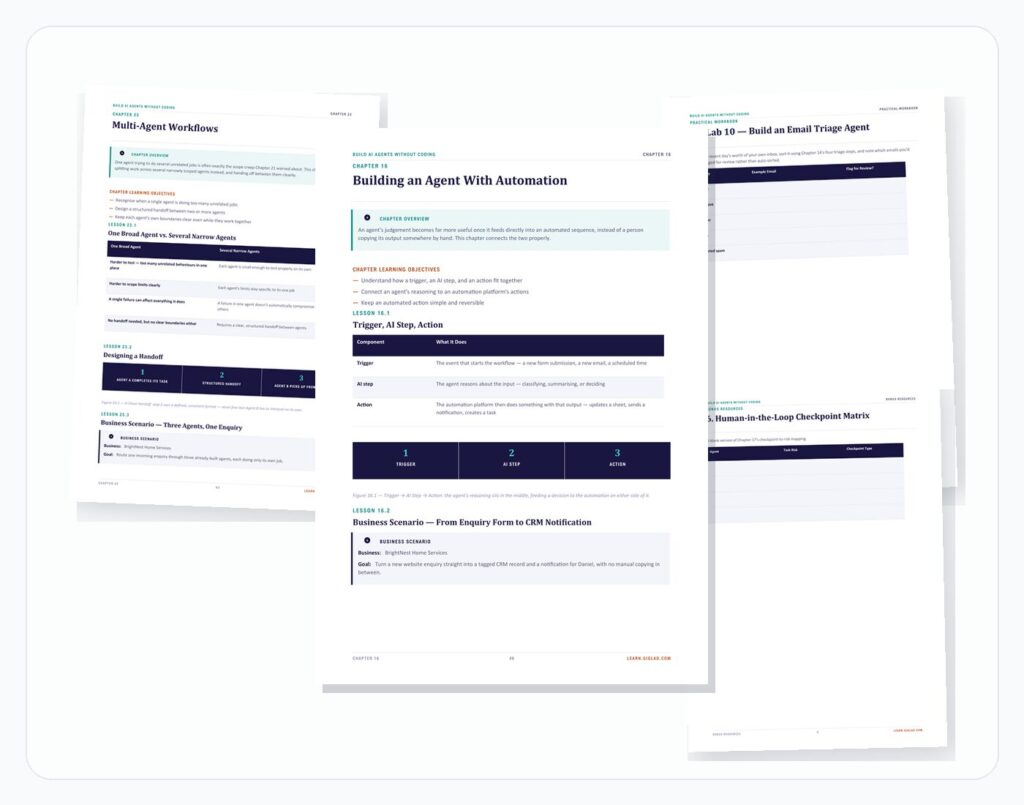
The full 25-chapter course, following one consistent fictional business — BrightNest Home Services — through real agent builds across support, research, content, leads, email and admin.
- 25 chapters, 71 pages
- One consistent fictional business and team throughout
- A platform-agnostic approach, built on custom diagrams, not one vendor's screenshots
- A full chapter on privacy and permissions, and a full chapter on avoiding over-automation

Practical Workbook
26 worksheets matching every stage of the course, including all 21 Labs, so you design and test your own agents rather than just reading about someone else's.
- Agent readiness assessment and eight-block mapping exercise
- Design canvas, instruction builder and knowledge-audit worksheets
- Testing plan, debugging log and permissions audit exercises
- Your own AI Agent Action Plan and 30-day deployment plan

Checklists, Templates & Final Assessment
18 quick-reference checklists, 10 bonus resources including 50 ready agent ideas, and a full final assessment with a fully explained answer key.
- 18 on-the-day checklists, from agent readiness through to a pre-launch check
- 50 agent ideas organised by category, plus 9 blank planning templates
- A human-in-the-loop checkpoint matrix and performance scorecard template
- 36 assessment questions across five formats, fully answered

Certificate of Completion
A downloadable certificate to mark that you've finished the course — a genuine addition to your CV and LinkedIn profile.
- PDF format, ready to save or print
- Personalised with your name and completion date
Delivered as digital files viewable on any device. Estimated course completion time: around 8–10 hours, plus your own hands-on build time.
- Course Ebook
- Practical Workbook
- Checklists, Templates & Final Assessment
- Certificate of Completion
Secure checkout. Instant digital delivery — download links arrive by email right after payment.
Includes lifetime access.
Trending Products








Frequently Asked Questions
No. This course is written for complete beginners with no coding background, and focuses entirely on no-code agent-building platforms.
No, and that's deliberate. No-code agent platforms change quickly, so this course teaches transferable design principles using custom diagrams rather than screenshots of one vendor's interface — the techniques work whether you use a ChatGPT-based assistant, Zapier, Make, n8n, Copilot Studio or another platform.
You'll receive six PDF files: the course ebook, the practical workbook, the checklist pack, the bonus resources pack, the final assessment with answer key, and a certificate of completion — instantly after checkout.
No — this course works perfectly as a standalone course. It builds on the same practical, tool-agnostic approach but goes specifically deeper into agent architecture, tool use, instructions, memory, testing and safety, without repeating that course's content.
Ready to Build a Real, Working AI Agent?
Get the full course, workbook, checklist pack, bonus resources, final assessment and certificate — and design, build and deploy the first AI agent your business can genuinely rely on.
Secure checkout. Instant digital delivery — download links arrive by email right after payment.